The latest Sega Saturn emulator - Ymir, has been updated.

New features and improvements
- App: Added Discord Rich Presence support
- App: Added option to File menu to open the screenshots directory
- App: Added option to unpause emulator when loading discs. Enabled by default, which changes established behavior
- App: Clarified IPL ROM meaning in the Welcome window and IPL settings tab -- it refers to the BIOS
- App: Display volume indicator on the top-right corner of the window for a few seconds after adjustments
- pp: Persist SMPC data per region based on the loaded IPL ROM region:
 - smpc-us_eu.bin: USA, Europe -- SMPC area codes 4, 5, A, C, D
 - smpc-jp.bin: Japan -- SMPC area code 1
 - smpc-asia.bin: Korea, Taiwan -- SMPC area codes 2, 6
 - smpc-other.bin: Other (invalid) SMPC area codes
 - The old smpc.bin will be automatically migrated to these files as you use IPL ROMs for each region
- App: Shrink embedded M PLUS U font files by removing unused glyphs, reducing binary size
- Build: Lower macOS version requirement to 12.0 Monterey
- Debugger (SH2): Break when PC is unaligned or in an illegal area while debug tracing is enabled
- Debugger (VDP2): Added RBG0 and RBG1 line color single stack views to the VDP2 debug overlay
- Debugger (VDP2): Added basic VDP2 registers view
- Graphics: New graphics backend, adding support for native graphics APIs:
 - Direct3D 12 on Windows
 - Metal on macOS
 - SDL Renderer wherever it's supported
 - Vulkan and Direct3D 11 didn't make it in time for this release
- Input: Added option to constrain mouse cursor to window in system cursor mode
- Input: Convert 3D Control Pad analog stick to D-Pad inputs when in digital mode
- Input: Graduate Virtua Gun to stable feature
- Input: Introduce a small amount of jitter to the Virtua Gun aim in Death Crimson. Greatly improves shot detection in the game
- Media: Added support for MP3 and OGG audio tracks to CUE loader
- SCSP: Threading microoptimizations -- up to 10% faster
- SH2: Interrupt recalculation microoptimizations -- 1-3% faster
- SMPC: Remove direct dependency to filesystem API for data persistence
- VDP1: Software renderer performance microoptimizations:
 - Do these once per command instead of per pixel:
  - Determine double density mode
  - Get references to VDP1 registers
  - Shift/mask color bank values
- VDP1/VDP2: Hardware-accelerated rendering with Direct3D 12 is now available

Fixes
- App: Don't persist window geometry in full screen mode
- App: Initialize MIDI subsystem asynchronously. Fixes some cases where the application takes a long time to start up
- App: Reset window geometry if it matches the bounds of a display to prevent "remember window geometry" from loading full screen coordinates
- Backup RAM: Fix crash when attempting to load a backup RAM cartridge with the default path
- Backup RAM: Remove strict language check when importing files. Fixes importing save files from Kronos's backup RAM cartridges
- CD Block (HLE): Adjust calculated sector sizes to requested get length
- CD Block (HLE): Create a dedicated scratch buffer for disc playback. Fixes crashes on replays in Virtual On - Cyber Troopers
- CD Block (HLE): Emulate read FIFO for all read transfers
- CD Block (HLE): Get/Calculate Actual Size nuances
- CD Block (HLE): Handle default end of disc parameter in Play Disc. Fixes Gunbird song not resuming after pausing
- CD Block (HLE): Introduce Busy status when pausing playback and ending data transfers. Fixes multiple games:
 - Amagi Shien now goes in-game
 - Brain Battle Q (Japan) now goes in-game
 - Flash SegaSaturn Vol. 29 - Langrisser V demo now plays in full
 - Hebereke's Popoitto now goes in-game
 - Hissatsu Pachinko Collection now goes past the SEGA licensing screen and reaches in-game
 - Legend of K-1 - The Best Collection FMVs no longer corrupt
 - Magical Drop III - Toretate Zoukan-gou! now plays intro animation after Data East logo
 - WanChai Connection now goes in-game
- CD Block (HLE): Report current CD status and raise CMOK HIRQ signal when processing unimplemented commands
- CD Block (HLE): Report wait status when attempting to calculate actual size of more sectors than available in a partition
- CD Block (HLE): Read reset position flag correctly from parameters
- CD Block (LLE): Fix audio track playback failing for tracks 16 and higher. Fixes Virtual On - Cyber Troopers credits and the songs in certain arenas
- GameDB: Disable a number of game-specific hacks that are no longer required:
 - Chisato Moritaka - Watarase Bashi and Lala Sunshine: no longer crashes at startup
 - Deep Fear: no longer freezes after the "April Fools!" voice line
 - Marvel Super Heroes vs. Street Fighter: no longer crashes at the end of the Capcom logo
 - Mega Man X3 / Rockman X3: sprites are not glitched anymore
 - Metal Fighter Miku: goes in-game, no longer stuck after start menu
 - Soviet Strike: VDP1 graphics no longer flicker
- GameDB: Force-enable SH-2 cache emulation for multiple games:
 - Dino Island: fix palette glitches
 - Dragon Force II: fix black screen when entering 100 vs 100 battles
 - Hissatsu!: fix crash at startup
 - No-appointment Gals Olympos: fix crash during animations
- GameDB: Force fast bus timings on Resident Evil to fix start menu crashes
- GameDB: Slow down VDP1 execution speed in 3D Baseball to fix team name plates and announcer voice line glitches
- GUI: Reinitialize style from scratch when rescaling GUI elements. Fixes Settings windows (and probably others) from growing extremely large when constantly switching display scales
- Input: Set least significant bits of 3D Control Pad analog reports to all ones. Fixes double inputs in Deep Fear
- Input: Make 3D Control Pad peripheral report in digital mode match the Standard Pad. Fixes broken inputs in digital mode in the following games:
 - Bug Too!
 - Black/Matrix
- Media: Don't read the Path Table past the size specified in the Volume Descriptor. Fixes CD Block HLE not able to read disc images made with some lazy patches that don't properly clean up the Path Table
- Media (CHD): Fix several CHD read errors
 - Arcade Gears Vol. 2 - Gun Frontier: now boots with CD Block LLE and plays sounds in the logo screen
 - Elevator Action^2 - Returns: now plays music in-game with CD Block LLE
 - Time Bokan Series - Bokan to Ippatsu! Doronbow Kanpekiban: now plays music in-game with CD Block LLE
 - Sega Ages - OutRun: now properly resumes music after pausing in-game with CD Block LLE
- Media (CUE): Concatenate reads from composite readers. Fixes Cold Case (Homebrew) crashing when starting the game
- Media (CUE): Don't accumulate pre/postgaps multiple times per track. Fixes some audio track offset issues for single-BIN dumps
- Media (CUE): Properly compute track count on discs with sparse track numbers. Fixes audio playback on some homebrew discs that omit tracks (e.g. The Rockin'-B All Stars version 06/03/23 skips track 2)
- Media (CUE): Use CUE sheet timestamps to compute track lengths. Fixes some audio track offset issues for single-BIN dumps
- SCSP: Clear slot PLFOS on reset
- SCSP: Handle rare one-shot PCM bug
- SCU: Allow 8-bit writes to DSP registers
- SCU: Ignore DMA writes to VDP1 registers. Fixes GunBlaze-S not booting
- Settings: Apply CD Block LLE configuration at startup. Fixes Ymir always launching with CD Block HLE mode when LLE was enabled in the settings file
- SMPC: Ignore SSHON command when the Slave SH2 is already enabled. Fixes multiple issues:
 - Guardian Heroes no longer gets stuck on level transitions
 - Gekitotsu Koushien no longer crashes when going in-game
 - Madden NFL 97 (Europe) now goes in-game
 - No-appointment Gals Olympos now goes in-game
 - Ten Pin Alley now goes in-game
 - UEFA Euro 96 - England now goes in-game
- SMPC: Reserved SR bits in INTBACK status reports are all set
- SMPC: Tweak processing time for INTBACK. Fixes Assault Rigs no-boot regression
- SMPC: Tweak response delay for most commands to allow more games to boot:
 - Destruction Derby (Europe)
 - Fighting Vipers (Japan) (Rev A)
 - Fist (Japan)
 - Idol Mahjong - Final Romance R (Japan) and its Kisekae Discs
- SMPC: Update peripheral PDR1/2 registers when reading and when updating EXLE. Fixes many cases of games not recognizing Virtua Gun inputs or missing shots
- VDP1: Don't clear COPR when beginning a new VDP1 frame. Fixes lockups in Alone in the Dark - One-Eyed Jack's Revenge
- VDP1: Don't sync VDP1 FBRAM on debug reads. Fixes deadlock when viewing the framebuffer area in a memory viewer window
- VDP1: Force-align MSB write to 16-bit addresses when writing pixels with MSB enabled. Fixes deselected menu options being fully painted in black in Derby Analyst
- VDP1: Textured sprites with CMDSIZE.H=0 never fetch additional texels. Fixes glitched graphics in the scorecard of the shooting range in Policenauts
- VDP1: Various VDP1 reset fixes
- VDP1-SW: Write back FBRAM writes from VDP1 renderer thread. Fixes glitched title screen in Waialae no Kiseki - Extra 36 Holes and other golf games sharing the same engine when using threaded VDP1 rendering
- VDP2: Allow 8-bit register reads and writes. Fixes crash after defeating second boss of DoDonPachi
- VDP2: Avoid unintentional side effects on VDP2 EXTEN register when saving states. Fixes camera angles in Digital Dance Mix Vol. 1 - Namie Amuro
- VDP2: Disable color gradation if color RAM mode is not 0. Fixes the fog effect in The River of Dreams level in Astal
- VDP2: Fix coordinate latching on external latches. Fixes various Virtua Gun shot offset errors
- VDP2: Fix off-screen coordinate latching. Fixes some Virtua Gun reload detection issues
- VDP2: Restrict color calculations in certain video modes. Fixes Sound Test screen text blending in with the background in Dark Savior
 - In high resolution modes with color RAM modes other than 0, color calculations can only be applied on top of RGB layers, but not palette layers
- VDP2-SW: Fix out of bounds access when the display resolution is changed mid-frame while drawing an RBG
- VDP2-SW: Fix race condition reading VDP1 TVMR on VDP2 thread. Fixes single frame glitch in Virtua Fighter 2 after selecting characters
- VDP2-SW: Stop updating LNCL/BACK screen once DISP is disabled for the remainder of the frame
A new version of one of the best NES (Famicom) emulators has been released.

Qt/SDL
 Build System
  - Build system optimizations for faster compilation times
  - Added Linux thread sanitizer build support for improved debugging and memory safety analysis
  - Fixed build compatibility with older SDL2 versions that lack SDL_GetTicks64 function
  - Implementation of vcpkg build cache to reduce build time for Windows builds

 Media Support
  - Added support for FFmpeg 9 for enhanced video encoding compatibility and codec support

 Developer Tools
  - Integrated profiling tools for comprehensive performance analysis and optimization
  - Added configurable flag to control whether profiling tools are enabled

 Platform Support
  - Qt6 build improvements for better Linux support
  - Fixed Qt Wayland screenshot functionality with improved stability
  - Enhanced Qt/SDL screenshot handling with improved error reporting
  - Fixed immediate exit issue when SDL video driver is used on Qt Wayland
  - Updated Qt win64 auto build to use VS2022 and Qt 6.9.3
  - Updated macOS auto build to use Sonoma OS version

 Features
  - Basic netplay feature (experimental) - enabling multiplayer gaming over the network
  - JavaScript/ECMAScript scripting engine for Qt GUI - allows users to create custom UI windows and scripts using Qt's built-in JavaScript engine

 Features
  - Fixed Qt FCEUD_GetTime function to use 64-bit SDL_GetTicks64
  - Removed minor memory leak on application shutdown
  - Fixed profiler disabled macro
  - Cleaned up compiler warnings related to set but not used variables
Updated the ZX Spectrum emulator - Fuse.
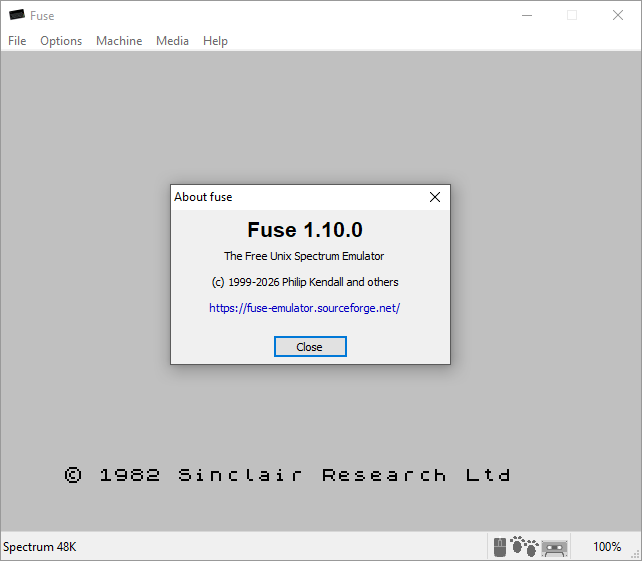
Emulation core improvements:
 - Expand automatic tape-loader detection and acceleration for Microprose, Software Projects, Gremlin 2 and Movieload loaders
 - Improve automatic tape playback for custom loaders, letting Basil the Great Mouse Detective, Viz: The Computer Game, Moonlighter and Trzy Wymiary load without manual tape control
 - Fix accelerated loading of Bomb Jack and similar loaders
 - Avoid accelerating the Technician Ted loader
 - Do not automatically restart rewound tapes at end of tape, making it easier to change sides in multi-side games such as Echelon
 - Handle bare tape flag blocks explicitly, improving compatibility with unusual tape images
 - Restore tape-loading sounds for beeper machines

Machine specific improvements:
 - Support both 8K and 16K Interface 1 ROM images, preserving their size in snapshots
 - Enable DISCiPLE on 128K machines, with inhibit behaviour and an exposed magic button in widget UIs
 - Correct +D address decoding for more accurate peripheral behaviour and software compatibility
 - Remove the beeper capability from Timex machines, their amplified beeper sounds different

User interface improvements:
 - GTK3: restart the fullscreen autohide timeout so menu and status bars respond immediately
 - GTK3 and SDL2: set the correct application identity so Linux desktop environments display the proper Fuse icon
 - Correct CAPS SHIFT handling when multiple host cursor keys are held
 - Show pulse counts for RLE Pulse blocks in the tape browser

Scaler improvements:
 - Improve the composite scaler, with better performance and colours correctly extended to the screen edges

RZX improvements:
 - Fix RZX playback desynchronisation from EI-delayed interrupts, letting affected recordings replay without desynchronising
 - Reproduce some Spectaculator CPU behaviour and +D snapshot paging, SPIN 0.5 frame-boundary and tape-save input quirks, and the R register from recordings made before Fuse 0.7, letting more recordings play correctly
 - Handle legacy Spectaculator Scorpion Z80 pages in Z80 snapshots
 - Place autosave snapshots after interrupt processing so unfinalised recordings can restart correctly in other RZX players
 - Report missing snapshots and compatibility warnings more clearly, making playback failures easier to diagnose
 - Fix the --playback command-line option so RZX playback can again be started from the command line

Debugger improvements:
 - Allocate Pokefinder working memory only when it is needed

The Sega Mega Drive emulator has received a landmark major release with version 1.0.0.
Newly Supported Hardware

    Sega/Mega CD
    Sega 32X
    Sega Pico
    Yamaha Copera (OPL3 emulation missing, but all known games are playable)
    Game Gear
    SC-3000/SG-1000
    Colecovision
    Hearbeat Personal Trainer peripheral (needed for Outback Joey and other HPBT games)
    Sega Multitap

Quality of Life Improvements

    Nuklear UI now works even if OpenGL is disabled/unavailable
    Nuklear UI can now be navigated by keyboard or game controller
    Controller type and SDL2 mapping can now be changed after initial configuration
    Controllers are now ordered based on which one receives input first
    Implemented DPI scaling
    Added multiple new shaders, including some 3rd party contributions
    Added option to use system file picker on Windows and Linux (GTK only for the latter)
    Added support for Unicode and long paths on Windows
    Some 6-button style controllers now have correct mappings out of the box
    New option to save config files in the application folder for "portable" setups

New Features

    Genesis/Mega Drive model selection: Enables emulation of model-specific hardware quirks
    VGM logging
    Oscilloscope View
    New media player mode that can play VGM files along with WAVE and FLAC files
    "Video" recording (APNG + WAVE)

Debugging Improvements

    Completely reworked the CPU debuggers with a turing complete scripting language
    Added watchpoints for both 68K memory and VDP registers/RAM
    Enhanced palette viewer
    Enhanced VDP plane viewer
    Implemented KMod logging extensions

Accuracy Improvements

    Separated comopsiting from final output. Fixes minor glitch in the DF Retro Direct Color DMA demo
    Reworked sprite rendering phase 3 to better match documentation by Kabuto/TiTan. Fixes Alex Kidd minigame
    Fixed reading version reg from Z80 and open bus reads from VDP test reg
    Fixed YM2612 busy flag timing
    Fixed a Z80 interrupt edge case which broke the music in Metal Blast 2277
    Improved open bus emulation
    Fixed some edge cases in VDP address/command register updates. Fixes the Mona in 344 bytes demo.
    Fixed timing of a number of 68K instructions
    Fixed YM2612 Timer B load behavior that caused slow music playback in the Konami driver
    Implemented VDP read latency and invalid write delays
    Fixed YM2612 key scaling in CH3 special mode. Fixes sound effects in Toy Story and Maui Mallard
    Fixed VDP rendering behavior when all planes are disabled via the VDP test register
    Implemented additional YM2612 pan "leakage" present on real hardware
    Implemented undocumented Z80/PSG clock speed bit in VDP test registers
    Fixed handling of auto-release in SSG-EG without HOLD. Fixes whistle sound effect in Strikers

Bugfixes

    Fixed crash when pressing escape with no ROM loaded
    Fixed immediate cancel in keybinding view when mouse was positioned where cancel button appears
    Fixed crash when changing video screen settings when in full-screen
    Fixed crash when loading save states in games with the "SRAM" variant of the Sega mapper
    Fixed crash when repeatedly reloading a ROM or a sequence of different ROMs
    Fixed a bug in the implementation of the 'in (c)' Z80 instruction
    Fixed crash when loading new ROM via drag & drop when existing ROM has lock-on
    Fixed a number of bugs in the controller mapping UI

Other Changes

    Added a 64-bit Windows build
    Added new 68K and Z80 interpreters for building on non-x86/x86-64 targets
    Added an experimental web build
    Added ROM DB entries for a number of games that needed them
Some very early work on LaserActive that emulates some parts of the PAC-less base player A developer known as LackofTrack has released an unofficial port of the classic Super Mario Bros. from NES/Famicom to the 8-bit Sega Master System. The project also includes new graphics and sound modes that leverage the hardware capabilities of the SMS.
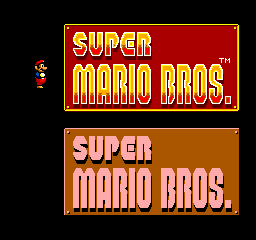
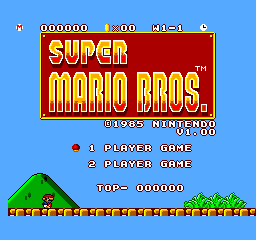
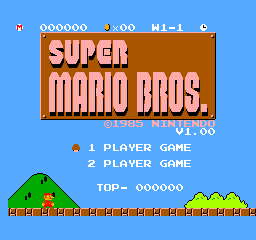
Near-perfect Accuracy: The game plays almost exactly like the original. While I cannot guarantee perfect accuracy, I feel confident that the port is accurate under normal gameplay.

New Graphics Mode: The port introduces a new graphics mode based on the SNES/SFC port of the game in Super Mario All-Stars/Super Mario Collection. Savor the pseudo 16-bit graphics with more color, backgrounds, and style!

New Sound Mode: The port also introduces a new sound mode that takes advantages of the YM2413 FM synthesizer found in the Japanese Sega Master System and commonly added to systems through aftermarket modifications. This new sound mode's music is based on the music in Super Mario All-Stars/Super Mario Collection. Immerse yourself in the rich, 16-bit style arrangements!
 - Requires a console with a YM2413.
 - The Sega Mark III's FM Sound Unit is not compatible with this mode.
Updated the ZX Spectrum emulator - Fuse.
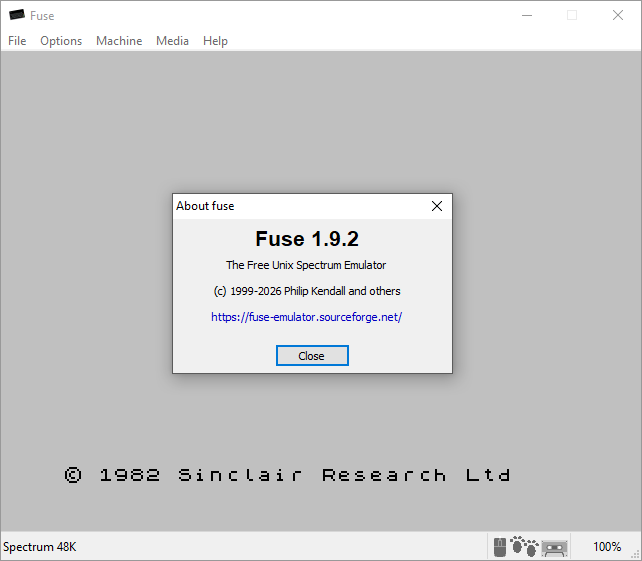
- Improve ZX Spectrum ULA beeper emulation with separate MIC and speaker paths and improved speaker-response modelling
- Automatically select the appropriate speaker response for each emulated machine, with universal manual overrides
- Preserve snapshot peripheral ROMs across soft resets and correct Multiface ROM handling after a machine reset
- Improve tape trap accuracy, including correct handling of short ROM blocks and ROM flag comparisons
- GTK3, SDL2 and Win32 UIs: coalesce dirty display areas per frame to reduce redundant scaling and presentation work
- Reduce display dirty-tracking memory usage and improve its address decoding
- Avoid rereading startup media files and improve Windows distribution dependency handling
- Expand display, scaler, snapshot, Pokefinder and Z80 disassembler test coverage, including MinGW builds
- Various minor bugfixes and cleanups
21:34, 20-08-2026: Flycast v2.7
21:57, 02-08-2026: Ootake v3.06
21:52, 02-08-2026: Fuse v1.9.1
21:46, 06-07-2026: kat5200 v1.0.0
13:23, 04-07-2026: Earthworm Jim "NES Edition"
18:54, 29-06-2026: Atari800 v7.0.0
07:50, 22-06-2026: Fuse v1.9.0
11:25, 01-06-2026: 86Box v6.0
08:22, 19-05-2026: 86Box v6.0 Beta
14:21, 17-05-2026: Fuse v1.8.0
06:01, 17-05-2026: PPSSPP v1.20.4
09:26, 12-05-2026: BigPEmu v1.221
09:04, 12-05-2026: NanoBoyAdvance 1.8.3
14:03, 08-05-2026: Super ZSNES v0.110b
06:24, 04-05-2026: Ymir v0.3.1
06:37, 24-04-2026: Ymir v0.3.0
05:54, 04-03-2026: PPSSPP 1.20.х
13:04, 22-01-2026: Dune 2: Full Version
22:06, 12-01-2026: Flycast v2.6
00:12, 11-01-2026: Ymir v0.2.1
10:34, 10-01-2026: Ootake v3.05
07:09, 07-01-2026: Favorite NES games of Emu-Land forum members over 20 years
22:04, 01-01-2026: Altirra v4.40
03:32, 25-12-2025: Happy winter holidays
09:14, 24-12-2025: WinUAE v6.0.2
09:02, 24-12-2025: BigPEmu v1.21
08:46, 24-12-2025: ePSXe 2.0.18 for Windows
00:12, 23-12-2025: 86Box v5.3
09:16, 22-11-2025: Deecy v0.5.3
02:23, 20-11-2025: melonDS v1.1
07:46, 27-10-2025: 86Box v5.2
10:12, 26-10-2025: VBA-M v2.2.3
00:33, 14-10-2025: Ymir v0.2.0
20:07, 14-09-2025: 86Box v5.1
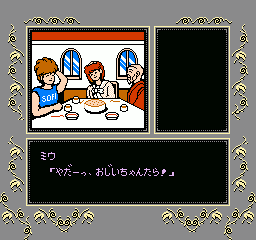
Seirei Gari
NES Games